Frequently Asked Questions Regarding SMS Text Messaging & Opt-In/Outs
Find answers to common questions about SMS opt-in and opt-out rules, filtering, and allowed message types.
Can my Rocket Matter CRM SMS messages be blacklisted as spam?
Recipient mobile phone carriers always reserve the right to filter out messages from certain numbers and routinely do so to protect their users from spam.
Can I port my existing toll-free number(s) into Rocket Matter CRM to use for text messaging?
Yes! Once you’ve ported your toll-free phone number(s) into Rocket Matter CRM it will be enabled for sending and receiving SMS messages as part of the porting process. Please let your account manager or our support department know that you would like to do this during your implementation or anytime to begin the porting process.
Please keep in mind that if you decide to port your toll-free number away from Rocket Matter CRM, your number may no longer be enabled for SMS messaging since that feature was provided by Rocket Matter CRM.
Does Rocket Matter CRM support STOP, BLOCK, and CANCEL (aka SMS STOP Filtering)?
Yes! By default, Rocket Matter CRM will handle the following messages on regular 10-digit local and toll-free numbers in accordance with industry standards:
- STOP, STOPALL, UNSUBSCRIBE, CANCEL, END, and QUIT will stop customers from receiving messages from that Rocket Matter CRM number. Only single-word messages will trigger the block. Further, the block works and is logged even if your number currently has no messaging request URL.
- Message: You have successfully been unsubscribed. You will not receive any more messages from this number. Reply START to resubscribe.
- START and YES will opt customers back in to the messages coming from your Rocket Matter CRM phone number, and these messages will also be delivered to your Rocket Matter CRM account.
- Message: You have successfully been re-subscribed to messages from this number. Reply HELP for help. Reply STOP to unsubscribe. Msg&Data Rates May Apply.
- HELP and INFO will return a message informing the customer that they can use the above commands to control the delivery of messages.
- Message: Reply STOP to unsubscribe. Msg&Data Rates May Apply.
Current opt-in/out process inside a record:
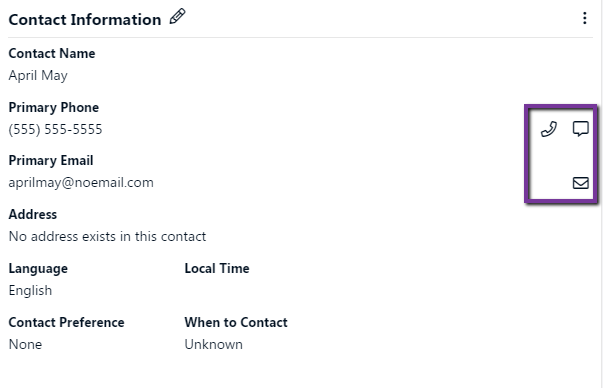
Opt-In/out options can be changed using the 3 dot menu:
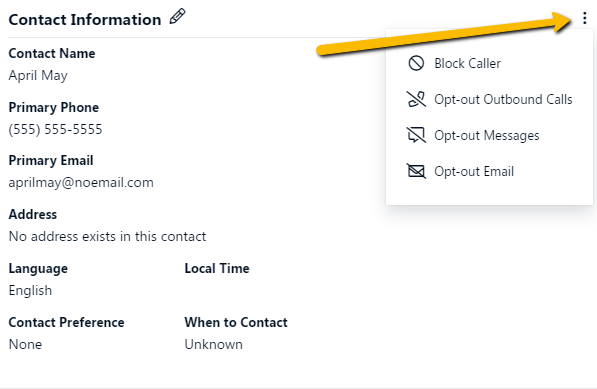
Detailed functionality:
- Block caller

- Primary contacts are blocked from contacting LR users via calls
- After enabling you will see the following:

- To unblock: Use the 3 dot menu and select “Unblock Caller”
- Opt-out Outbound Calls

- The system will stop automatically generating outbound calls for primary contacts
- To Opt-In use the 3 dot menu and select “Opt-In Outbound Calls”
- You also are not allowed to manually call them using the dialer unless you wish to override
- Opt-out Messages

- The system will stop automatically generating messages to primary contacts
- To Opt-In use the 3 dot menu and select “Opt-In Messages”
- You also are not allowed to send them manual messages unless you wish to override
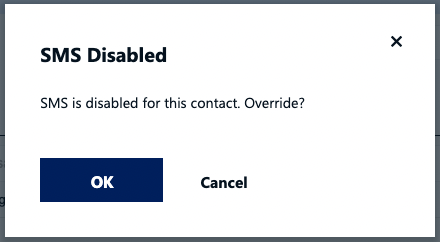
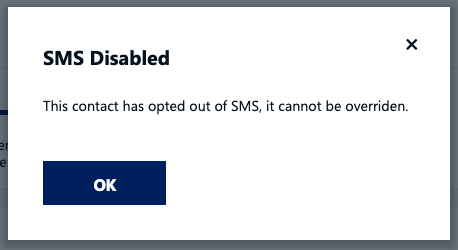
- If the primary contact has self-opted out you will NOT be able to override
- Opt-out Outbound Email

- The system will stop automatically generating emails to primary contacts
- To Opt-In use the 3 dot menu and select “Opt-In Email”
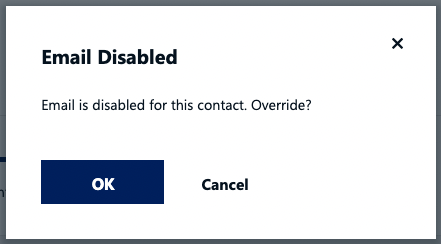
- You also are not allowed to send them manual emails unless you wish to override
Can my Rocket Matter CRM number send SMS to a non-Rocket Matter CRM SMS code 5-6 digit number?
No. Rocket Matter CRM numbers cannot send messages to or receive messages from any SMS codes at this time whether they are Rocket Matter CRM SMS codes or external SMS codes. This is a restriction of how the technology is provisioned by the mobile carriers.
What are the opt-in requirements for U.S. based SMS Text Messages?
Users can opt-in to SMS text messaging in several ways. In each case, the campaign’s opt-in message flow must meet certain compliance standards set by the wireless carriers. A Sample Opt-In Process on an SMS Code is shown below.
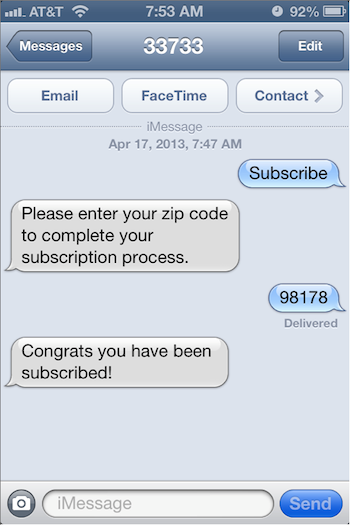
OPT-IN OPTION 1 – Mobile Phone Opt-In: Sending a text message from a mobile phone to an SMS code or 10-digit SMS Number to Opt-In
When a user “Opts-In” from a mobile handset by sending an SMS Text to your 5-6 Digit Short Code or 10-Digit SMS Text Number, a double opt-in process is advised, but not required. A compliant message flow should look like this:
*** This option does NOT require the user to reply “YES” to Opt-In, so please make sure that you have the mobile phone user’s consent to Opt them into your SMS Campaigns or firm notifications. A user can reply with “STOP” and it will opt them out, or they are in.
End user: {Keyword}
From your Rocket Matter CRM SMS 5 or 6-digit code: Welcome to {Campaign Name} {Description} Alerts! Msg&data rates may apply. {Message frequency} Reply HELP for help, STOP to cancel.
- The “description” should be a single word to define the kind of alerts, e.g. “Account Alerts,” “News Alerts,” “Promo Alerts,” etc.
- The message frequency must be specific, but can be any interval, for example: “1 message per day,” “4 messages per month,” “2 messages per transaction,” etc.
Hint: Our standard usage is: If the message frequency will vary based on user interaction, “1 message/user request” is standard.
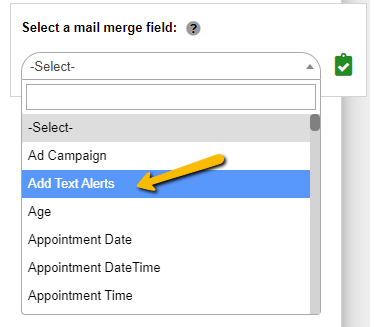
OPT-IN Option 2 - Users could Opt-In via automated emails sent by your firm. Text Alerts Opt-In button is now available in the mail merge picker in automation. This allows you to send emails to your clients to ask them to Opt-In to text messages from your firm.
Press the clipboard icon to copy the Add Text Alerts option and then paste (or Control-V on Windows, Command-V on Apple Mac). This will paste a Text Alerts opt-in button on your email campaign.
OPT-IN Option 3 – Not Phone-based Opt-in: Asking to receive text messages and giving your mobile number to a website, mobile app, paper form, via verbal agreement, or otherwise opting in without using a mobile phone.
When a user initially signs up with your firm by any means other than from a mobile handset, a double opt-in process is required.
A compliant message flow should look like this:
(User signs up without using a mobile phone, and receives a text message from the SMS code or your 10-digit number asking them to confirm opt-in)
SMS Code: Text YES to join {Campaign Name} {Description} Alerts. Msg&data rates may apply. {Message frequency} Reply HELP for help, STOP to cancel.
End user: YES
The "YES" reply from the end user will Opt-In the SMS Number.
Note: After the Opt-In is confirmed, a compliant welcome message is sent to the user’s mobile phone.
Being compliant is important to any firm. These guidelines are not based on Rocket Matter CRM’s management. They are based on wireless phone carrier conditions of SMS code service and other industry standards. Your company is required to comply with these guidelines in the use of any Rocket Matter CRM-provided SMS Text services. Please note, each wireless carrier reserves the right to suspend SMS service for any user at any time, so please do your best to stay compliant and enjoy the benefits of SMS technology!
Can I use SMS messaging for Emergency purposes?
No, offering any Emergency Services which connect users to emergency services personnel or public safety answering points, such as 911 or E911 services, violates Rocket Matter CRM’s Acceptable Use Policy and is not allowed.
It is acceptable to use Rocket Matter CRM to send notifications that do not directly impact life safety. For example, early warning alerts, safety advisories, event cancellations, etc. are allowed. We always recommend building in redundancy for important applications and using Rocket Matter CRM’s notifications in conjunction with other public warning systems like sirens, radio, and TV broadcasts if applicable.
Can I send SMS messages from Facebook and other services to Rocket Matter CRM?
Facebook, Google, and other services that use shortcodes to send SMS messages will not be able to send messages to Rocket Matter CRM phone numbers. This is because SMS code carriers have arrangements to exchange messages with mobile phone numbers only, and Rocket Matter CRM phone numbers are not considered mobile phone numbers.
What happens when I attempt to send SMS messages to a landline?
Currently, the behavior is dependent on the location of the recipient.
When sending a message to a landline number in the US or Canada:
Rocket Matter CRM will not check whether it is a landline and will send it to the upstream carrier for delivery. The message will not be received, and the message status may be marked as “sent” or “undelivered” and the account will be charged.
It is best practice to use the “Primary Phone” (Cell Phone) field in Rocket Matter CRM to designate which phone numbers are able to accept SMS text messages and use the other two Phone # fields in Rocket Matter CRM for non-mobile numbers.
What types of content does Rocket Matter CRM SMS Text support?
Supported file types for sending/receiving MMS messages.
For sending MMS messages, Rocket Matter CRM fully supports the OMA Specification, including jpeg, png, and gif images. However, depending on the carrier and device of the end user, some messages may not be successfully received and we recommended testing before sending.
Please contact Rocket Matter CRM support for further information if you are interested in enabling MMS messages.
What kind of SMS messages are not allowed to be sent using Rocket Matter CRM?
Rocket Matter CRM’s Acceptable Use Policy (AUP) describes actions that are not permitted using Rocket Matter CRM. Rocket Matter CRM’s Terms of Service (ToS) describes the agreement between you and Rocket Matter CRM regarding the use of Rocket Matter CRM’s website and/or services.
Below is a list of highlights from the AUP of what practices are not allowed when sending and receiving SMS messages using Rocket Matter CRM. Please note that the following restrictions apply to the owner of the Rocket Matter CRM account and to all users of your application.
Follow these guidelines and you will likely be compliant with federal and state restrictions, carrier regulations, and best practices established by industry trade groups. This list is provided by way of example and should not be considered exhaustive.
Note: These guidelines do not replace nor cover all prohibited activities as covered by the Rocket Matter CRM Acceptable Use Policy or full Rocket Matter CRM Terms of Service.
The following behaviors are not permitted in Rocket Matter CRM:
- Sending unsolicited messages
- No one likes SPAM. You should only send SMS messages to recipients who have opted-in to your service and are expecting communication from you. Rocket Matter CRM actively monitors for this kind of activity and we may block the phone number or suspend your account if we receive complaints from your subscribers.
- Sending mass marketing or bulk messaging using Rocket Matter CRM long code phone numbers
- Mobile carriers do not allow marketing SMS messages, whether solicited or not, to be sent on regular 10-digit numbers. Marketing messages may only be sent using SMS codes (special 5 or 6-digit numbers). If you’re interested in a dedicated US SMS code, then please contact our sales or support team.
Mass marketing restrictions vary from country to country. Rocket Matter CRM does not support mass marketing on US or international phone numbers.
- Sending harassing or abusive messages
- Sending threats, unwanted messages, and “SMS-bombing” – sending many messages to a single number without the recipient’s permission – are not allowed on Rocket Matter CRM. You are responsible for ensuring that the users of your application do not send harassing or abusive messages.
- Using Rocket Matter CRM numbers to provide emergency services, such as 911-types of communication
- Inbound and outbound communications between emergency service providers and end users are explicitly not permitted on Rocket Matter CRM numbers. SMS notifications can be used to provide information during an emergency, but should not be used as a replacement for or a means to contacting actual emergency services.
It is acceptable to use Rocket Matter CRM to send notifications that do not directly impact life safety. For example, early warning alerts, safety advisories, event cancellations, etc. are allowed. We recommend building in redundancy for important applications and using Rocket Matter CRM’s notifications in conjunction with other public warning systems like sirens, radio, and TV broadcasts if applicable.
- Engaging in fraud, phishing, or sending of sensitive data
- Rocket Matter CRM takes fraud and abuse very seriously. Sending messages with fraudulent information or phishing to request confidential information from subscribers is not allowed. It’s also never a good idea to provide financial information or any other sensitive personal information to your customers over SMS.
- Misrepresenting your identity (no spoofing)
- Spoofing the SenderID or otherwise attempting to mislead message recipients as to who is sending the SMS message is not allowed. It’s good business sense to identify your brand or name in each message you send. But it’s not ok to identify yourself as another individual or business.
- Sending messages with pornographic or objectionable images
- Do not send pictures that promote or potentially further any illegal activity or violate any legal or federal legislations or are likely to cause offense to recipients. These include but are not limited to pornographic or objectionable images.