Customize your statement of account, control data views permissions.
Enhancements
Customize Your Statement of Account
Firm users with Setup > Firm Settings > Invoice Settings permission can now modify the statement of account cover page the same way they customize invoice templates.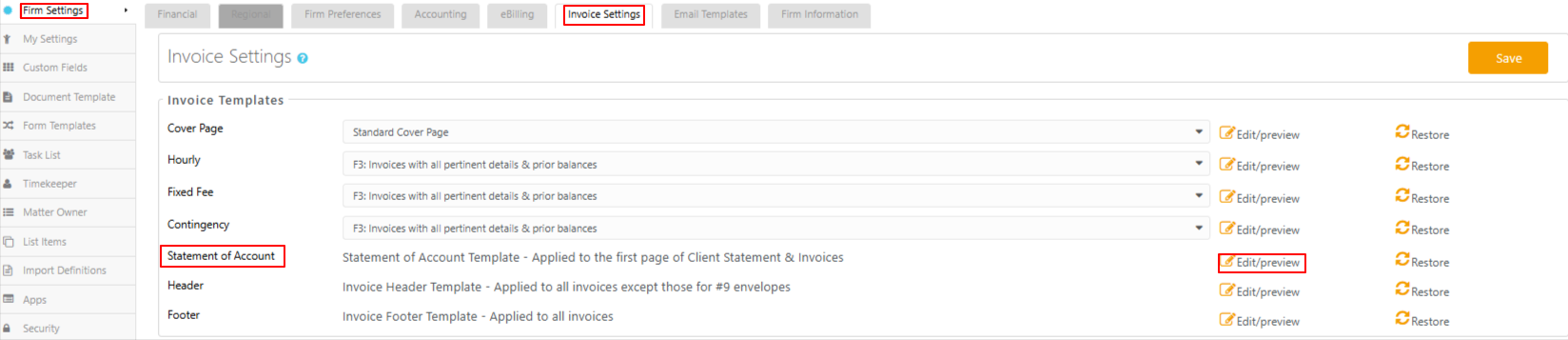
Why it matters: Your statements of account can carry the same firm branding and formatting as your invoices, giving clients a consistent, professional experience.
To learn more, read Customize Your Statement of Account
Balance Breakdown Merge Field
Building on statement of account customization, a new invoice merge field breaks the invoice balance out into its component parts, so you can show clients how a balance is made up rather than just the total.
| [#StatementofAccount1#] |
A table that displays the invoice statement broken down in the following columns:
|
Why it matters: Clients see exactly how their balance breaks down by fees, expenses, and taxes, reducing billing questions and giving your firm more transparent statements.
Permission Controls
- Data Views are now gated by role permissions, so restricted roles no longer see accounting data they shouldn't have access to.
- Unpaid Balance and Unbilled Balance are hidden from Matters grid hover cards for users without the Show Balance permission.
Why it matters: Sensitive accounting information stays visible only to the roles authorized to see it, keeping your firm's financial data properly protected.