new smart client portal, and more.
Enhancements
To learn more, see Conditional Logic in an Intake FormSmart Client Portal
The client portal has a refreshed design that's consistent with the rest of the application, and your clients now have a dedicated place to find and complete any forms you send them.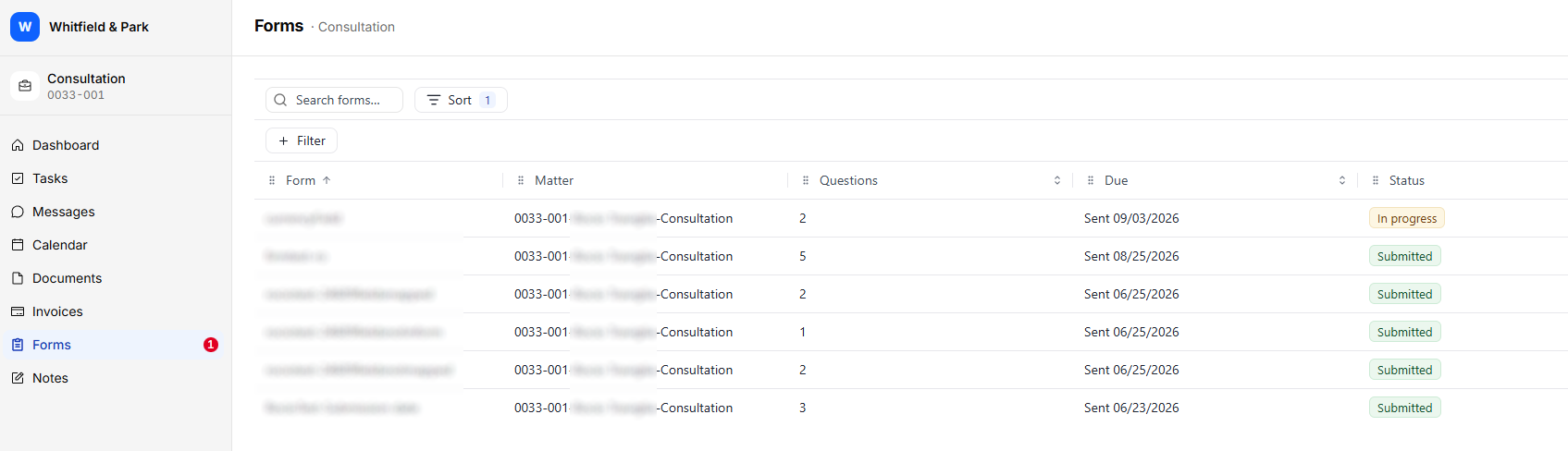
- A dedicated Forms section: Intake forms now have their own Forms section in the portal's main navigation, instead of sitting inside Notifications.
- Everything in one list: Clients see every form shared with them on their matter, including its name, its status, and when it was shared or last updated. They can open and complete a form straight from the list.
- Clear status at a glance: Each form shows whether it's New, In Progress, Submitted, or Expired, so clients know right away what still needs their attention.
Other Enhancements
To help you work faster day to day, we have also included these smaller improvements:
- Sort by custom fields on the Matters grid: You can now sort custom field columns on the Matters grid.
- More matter numbering options with NetDocuments: The NetDocuments integration now supports matter file numbers that include the year and other matter numbering elements.
- Change calendar owners in bulk: You can now change the Calendar Owner on several events at once using Bulk Edit in Calendar Grid View.
- Filter tasks and events by area of law: The Task and Calendar grid views now include an Area of Law column and filter.
- Easier-to-read trust reports: The Trust Ledger Balance report now repeats its column headers at the top of every page.
- Show an hours summary on invoices: The new [#HoursSummary#] merge field adds a table of Billable and No Charge hours, effective rate, and amount to Hourly, Fixed Fee, and Contingency invoices. To use it, add the field to your invoice template. To learn more, see Invoice and Letter Template Fields