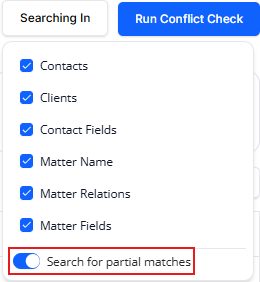
This release brings more control over bank feed alerts, and two reporting and compliance improvements you'll notice right away.
Enhancements
Bank Feed Notification Settings
If you're a firm administrator, you can now turn bank feed notifications on or off for the whole firm, and set the cadence that fits how your firm works.
- Go to Setup > Firm Preferences > Bank Settings to manage notifications for your firm.
- If these alerts aren't useful for how your firm works, you can switch them off entirely.
- When you keep notifications on, choose the cadence that works best for you: a one-time alert, a daily summary, or a weekly summary.
Choosing a daily or weekly summary instead of individual alerts means fewer, better-timed messages instead of a steady stream of notifications.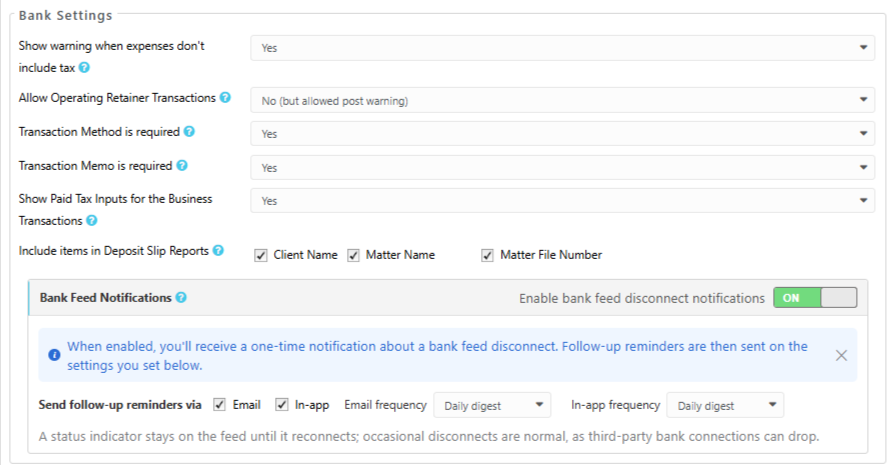
Matter Owner Column on the Pre-Bill Report
You can now see a Matter Owner column in the Summary view of the Pre-Bill (Matter Billing) report when All Matter Owners is selected. That means you can review and distribute pre-bills by owner without running the report separately for each person.
Conflict Check — Partial Matches On by Default
The Search for partial matches option is now enabled by default when you run a Conflict Check. You'll see near-matches and variant spellings on your very first search, rather than only after you change a setting yourself.