The Inactivity Timeout feature automatically logs users out after a period of inactivity.
Set Idle Period Duration Before Logout
To set the idle period duration before a user is logged out: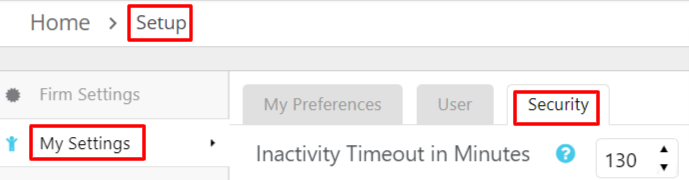
- From the toolbar, click your Profile icon.
- From the drop-down, select Setup.
- Near the top of the Setup left navigation, click My Settings.
- From the tabs atop the My Settings screen, click Security.
- In the Inactivity Timeout in Minutes field, take one of these actions to increase or decrease the idle period's duration in minutes before an automatic system logout:
- Use the arrows to increase or decrease the number of minutes.
- Overwrite the entry.
Note: You can set the idle period up to 360 minutes (6 hours).
An active timer prevents the inactivity timeout feature from logging the user out.