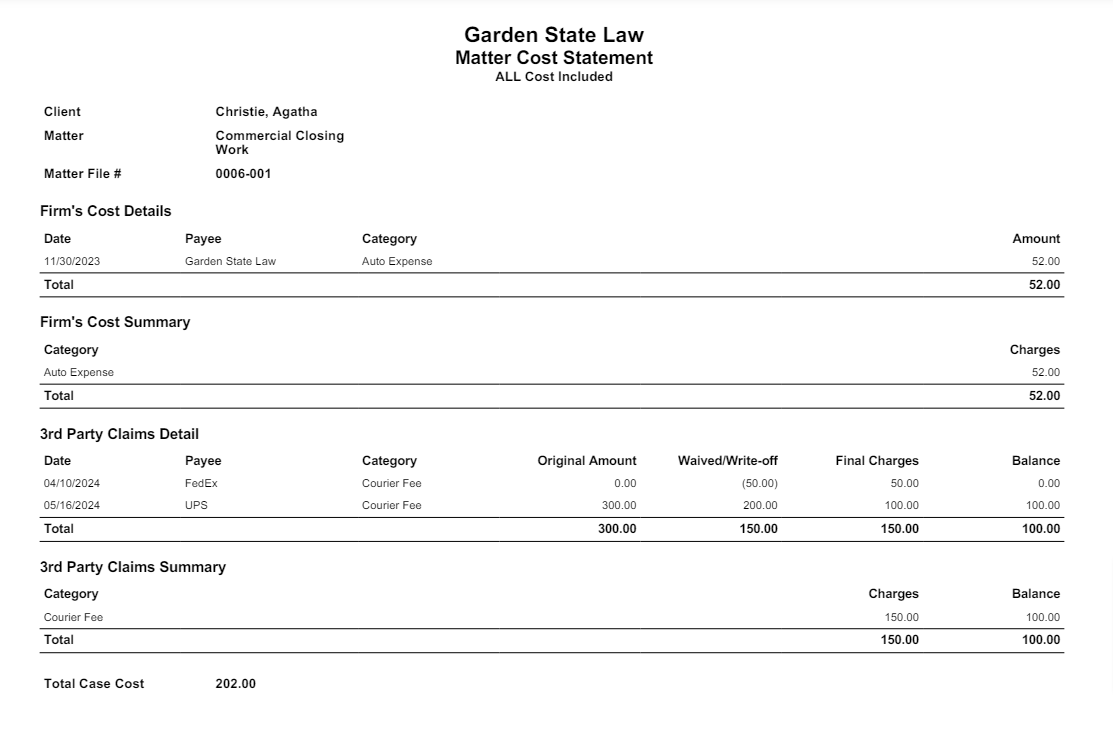
The Matter Cost Statement details all costs associated with a matter. This includes costs the firm incurred as well as those to be paid from trust at a later date.
Generate a Matter Cost Statement
- From the left navigation panel, click Matters.
- On the Matters screen, double-click the matter and scroll down to its summary section.
- From the tabs atop the Matters Summary section, click Banking.
- From the tabs atop the Banking screen, click 3rd Party Bills.
- From the toolbar atop the 3rd Party Bills screen, click Action > Report - Matter Cost Statement.
- In the Options section of the Report - Matter Cost Statement screen, click the radio button for Only Firm Cost, Only Third Party, or All.
- From the Print As field's drop-down, click your preferred report format.
- Click Generate.
Your report downloads to your default location.
Sample PDF Report