The finance charge function automates finance charge calculations on unpaid invoice balances when generating a new invoice, or on daily outstanding balances.
Watch a Video
Important to Know
- You must activate finance charges at the firm level for use at the matter level.
- Finance charges are computed at the:
- Invoice level, based on overdue balance when an invoice is being generated.
- Matter level, using the aggregate daily outstanding balance across all unpaid invoices on the matter.
- Once you have generated an invoice, changes you make will not be reflected in previously calculated finance charges. You must click Recompute to recalculate the finance charges.
Activate Finance Charges (Firm Level)
To activate finance charges:
- From the toolbar, click your Profile icon.
- From the drop-down, select Setup.
- From the Setup left navigation, click Firm Settings.
- From the tabs atop the Firm Settings screen, click Financial.
- Scroll down to the Finance Charge Settings section and check the box beside Calculate Finance Charges.
The Finance Charge Settings section expands, displaying additional fields.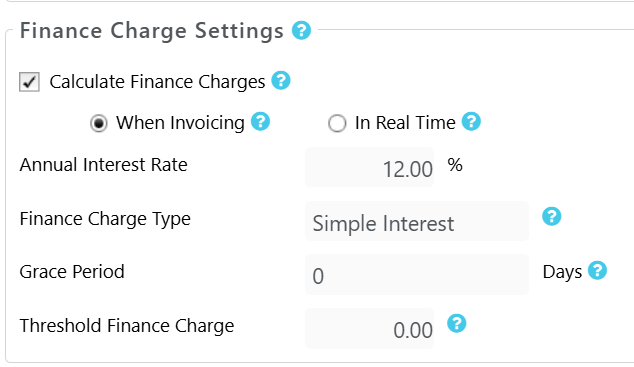
|
|
|---|---|
| Annual Interest Rate |
|
| Finance Charge Type |
|
| Grace Period |
|
| Threshold Finance Charge |
|
- In the upper right corner, click Save.
This activates finance charges for all new matters.
Override Finance Charges (Matter Level)
While your firm level finance charge setting will be the default for all matters, you can override the firm setting within each matter.
To override finance charges in a matter:
- From the left navigation panel, click Matters.
- From the Matters screen, single-click the matter, click on the three dots at the end of the row and from the drop-down, click Edit.
- From the tabs atop the Matter's Summary section, click Settings.
- From the tabs atop the Settings section, click Billing.
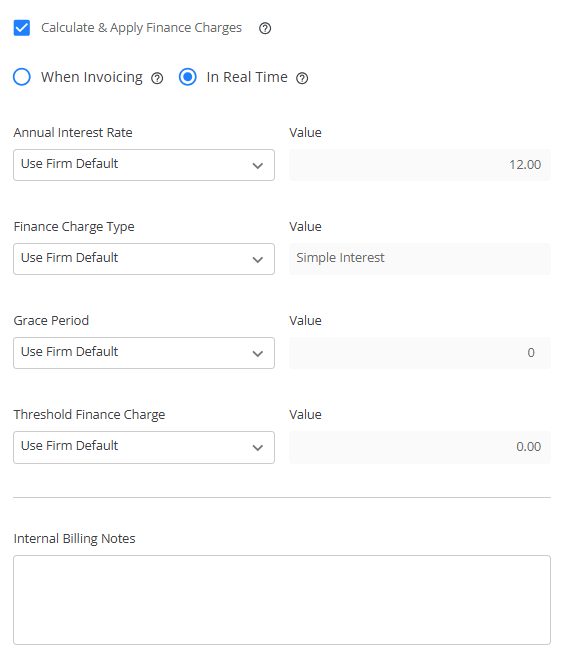
- In the Options section, check the box to Calculate and Apply Finance Charges.
The section expands, displaying the option to choose between Finance Charge When Invoicing or In Real Time, Annual Interest Rate, Finance Charge Type, Grace Period, and Threshold Finance Charge fields and their respective firm level defaults. - From the applicable drop-downs, click Custom.The fields activate for editing.
- Enter your overrides.
- Click Save.
Your overrides apply to this matter.